
Manage your card
The card editor is the heart of the system — every detail can be updated anytime.
Edit your basic info
From the Dashboard, tap "Edit" (the pencil icon) on the card you want to change. You can update:
- Full name & title — the name and role shown on your card.
- Organization / company — your business or school's name.
- Department / class — clearly separates departments in a company, or classes for Edu cards.
- School year — a field specific to Edu cards (e.g. 2023 - 2027).
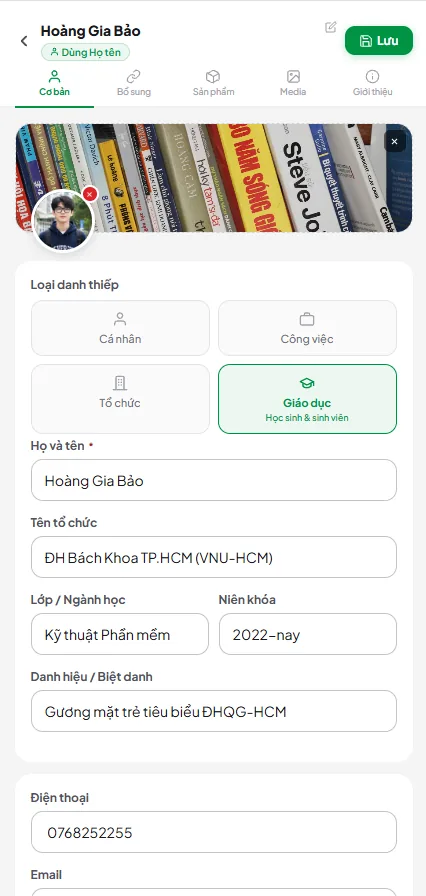
Avatar & banner
The image manager automatically compresses photos right in your browser before uploading, so your card stays fast to load even from a large original file — and when you upload a new photo, the old one is cleaned up from storage automatically. You can even upload and crop your avatar during the very first card activation screen, no need to dig into settings.
Organization cards
When your account is linked to an organization, a dedicated organization card appears in your Dashboard, with a few key differences from a personal card:
- Synced design — layout, colors, and logo are set centrally by the organization admin to keep brand identity consistent.
- Field locking — sensitive fields (logo, banner, official name, department, title, work email) are read-only, while personal fields (phone, personal social links...) remain fully editable.
- Sync policy — depending on the admin's configuration, design changes from the organization apply automatically, require your confirmation, or let you choose when to apply them; a visual comparison screen always shows exactly what changed before you agree.
- Set as default — make your organization card your primary card so your personal link always shows the right work card first.
Template sync when your organization updates its design
When an organization admin pushes a new design/template to every member, the sync only touches the fields the organization has locked — your personal data is always preserved:
- Fields you're allowed to edit yourself (not locked) — including your avatar, banner, and design — keep whatever you've set, they're never overwritten by a new template push.
- If a field in the organization's template is left blank, the system won't erase the data you already have in the matching field.
- The contact fields (phone, email, website, address) on the edit form show a hint when left blank on the org template: "Để trống: giữ nguyên dữ liệu trên thẻ thành viên" (leave blank to keep the member's current data).
Multi-language
Cards support 5 display languages: Vietnamese (default), English, Chinese, Korean, and Japanese. Visitors can switch the display language with a floating picker on the public page, and the system remembers their choice as they browse other cards. As the card owner, you can enter translations for your name, title, organization, and bio yourself — if a translation is missing, the original Vietnamese content is shown instead.
Social & contact links
Add unlimited contact channels to your card: